Updated Fluids Library
If the data in a shared fluid library is changed outside of the model you are opening, the following informational message will appear when opening the file:
The following fluid(s) used in the scenario have different property data than what is currently in the library:
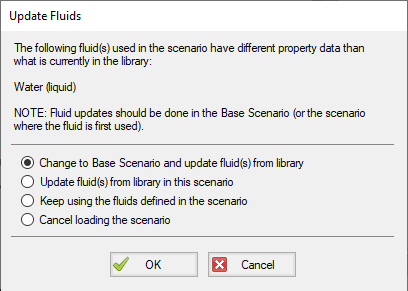
Figure 1: Update Fluids dialog window which appears if the fluid properties for the model have changed since it was last opened
There are a few reasons that the fluid data may have been changed:
-
The model was defined in a previous version of Fathom using a fluid from the AFT Standard fluid library. The AFT Standard fluid library was updated in AFT Fathom 12 in order to standardize the reference data. If the model uses the same fluid properties for all scenarios, it is recommended to use the "Change to Base Scenario and update..." option to update the fluid properties throughout the model. If different scenarios use different fluid properties then it is recommended to use the "Update fluid(s) from library in the scenario" option to update each scenario individually.
-
The model is defined with a custom fluid in the Fluid Library and the custom fluid was modified outside of this model. If the fluid was changed in error, then choose the "Keep using the fluids defined in the scenario" option or cancel loading the model and change the fluid. If the changes were intended then update the fluid data used in the model using the "Change to Base Scenario and update..." option.