Arrange Menu
-
Primary Windows - Configures the primary windows in two panes arranged horizontally or vertically. Tabs can be dragged to the docking guide to adjust layout (see Figure 1).
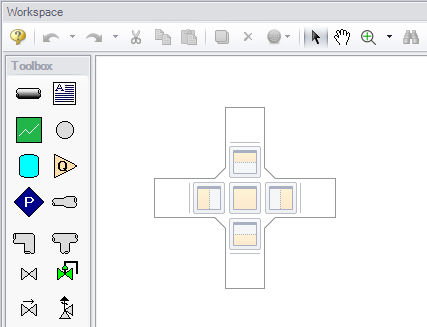
Figure 1: The Docking Guide can be used to view multiple primary window tabs at the same time
-
Sort Table By - (Output only) - Sorts tables in the Output window by any variable in ascending or descending order.
-
Rotate Icon Right or Left - (Workspace only) - Rotates icons for all selected junctions on the Workspace clockwise or counterclockwise.
-
Auto-rotate Icon - (Workspace only) - Rotates the selected icon or icons to align with connected pipes on the Workspace, if possible.
-
Rotate Selection Right or Left - (Workspace only) - Rotates the selected pipes and junctions as a group on the Workspace clockwise or counterclockwise.
-
Align - (Workspace only) - Aligns selected pipes and junctions in the Workspace. Alignment can be applied to pipes and junctions together, pipes only, or junctions only, horizontally or vertically.
-
Pipe Drawing Mode - (Workspace only) - Selects the grid layout used for drawing on the Workspace.
-
2D Freeform - Places junctions freely on the Workspace without grid constraints.
-
2D Orthogonal - Enables orthogonal drawing in the Workspace. This toggle is a shortcut to the orthogonal drawing option in the User Options window.
-
Isometric - Uses an isometric grid on the Workspace.
-
Snap to Grid - (Workspace only) - Available for 2D grids (on by default for isometric grid). Toggles snapping of Workspace pipes, junctions, and annotations to the grid as specified in the User Options window.
-
Show Grid - (Workspace only) - Shows or hides the Workspace grid as specified in User Options window.
-
Make Selected Pipes and Jcts Orthogonal - (Workspace only) - Forces all selected pipes, and pipes connected to selected junctions, to follow orthogonal paths on the Workspace.
-
Flip Vertex - (Workspace only) - When orthogonal drawing is enabled, flips the vertex of all selected pipes on the Workspace to the opposite corner configuration.
-
Scale/Flip Workspace - (Workspace only) - Scales (shrinks or expands) or flips either the current selection or the entire set of pipes and junctions on the Workspace.
-
Set Pipe and Junction Locations to Parent - (Workspace only) - Sets pipe and junction label locations in the current scenario to match the corresponding label locations in the parent scenario.
-
Reset Label Locations - (Workspace only) - Resets pipe and junction label locations to their default positions.
-
Disable Pipes Snapping to Isometric Grid - (Workspace only) - Overrides Snap to Grid for the selected pipe when an isometric grid is in use. Pipe endpoints no longer snap to grid points, and pipe segments no longer follow isometric grid lines.
-
Add/Remove Segments - (Workspace only) - Adds or removes visual segments along a pipe on the Workspace. Supports adding a single segment, adding a segment at a right angle, adding multiple segments, removing a single segment, or removing all segments between junctions.
-
Lock Object - (Workspace only) - Locks selected pipes and junctions on the Workspace to prevent movement. A lock symbol appears when an attempt is made to drag a locked object.
-
Reverse Direction - (Workspace only) - Reverses the reference positive flow direction of all selected pipes on the Workspace.